i Short answer
Cloud syncing keeps your platform settings, custom indicators, and chart layouts consistent across multiple devices automatically.
Overall security depends on your specific broker or platform's encryption and account protection measures.
📋 ON THIS PAGE
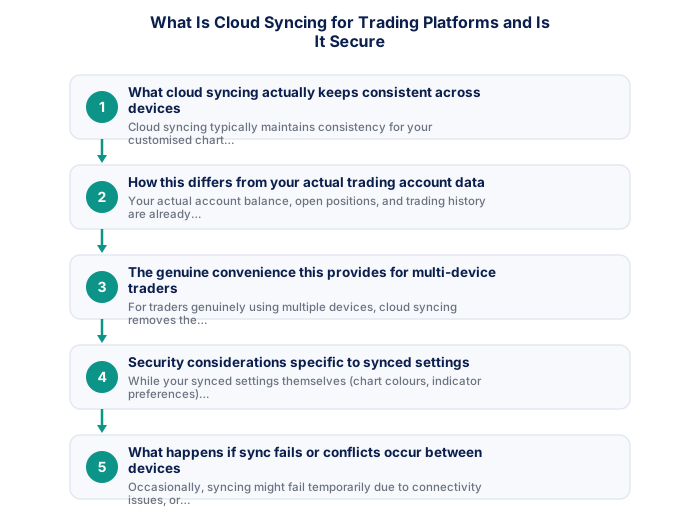
- What cloud syncing actually keeps consistent across devices
- How this differs from your actual trading account data
- The genuine convenience this provides for multi-device traders
- Security considerations specific to synced settings
- What happens if sync fails or conflicts occur between devices
- Checking your specific platform's sync security approach
1. What cloud syncing actually keeps consistent across devices
Cloud syncing typically maintains consistency for your customised chart layouts, saved indicator configurations, watchlists of frequently-monitored instruments, and sometimes saved templates for specific analysis setups you use repeatedly, ensuring this customisation appears consistently whether you're accessing the platform from desktop, mobile, or web.
It's worth checking exactly which specific elements your platform actually syncs, since coverage varies between providers, some platforms sync your full workspace comprehensively, while others sync only certain elements, worth confirming what you can actually rely on remaining consistent.
2. How this differs from your actual trading account data
Your actual account balance, open positions, and trading history are already centrally stored on your broker's servers regardless of any specific syncing feature, cloud syncing specifically addresses your personal interface customisation and preferences, which is a separate, complementary layer of consistency beyond the core account data itself.
See also: How Do Proprietary Trading Firms Work for South Africans?
It's worth keeping this distinction clear specifically because it affects how you think about data security here, your actual account balance and trade history are managed through your broker's core account system, discussed throughout this site's legal content, genuinely separate from this convenience-focused settings sync.
- Two-factor authentication enabled
- Unique password not shared with other sites
- Broker mobile app installed and tested
- Mobile data backup connection tested
- Price alerts set for active instruments
- Broker emergency number saved in phone
- Know how to close all positions in under 30 seconds
- Desktop: full charting, multi-monitor, all order types
- Mobile: real-time monitoring and load shedding backup
- Mobile: price alerts when away from desk
- Desktop: useless during load shedding without UPS
- Mobile: limited charting for detailed analysis
- Mobile: higher risk of fat-finger errors
- Full charting and analysis
- Best for trade entry
- Multi-monitor support
- More order types available
- Monitor and manage on the go
- Load shedding backup use
- Push price alerts
- Limited charting tools
3. The genuine convenience this provides for multi-device traders
For traders genuinely using multiple devices, cloud syncing removes the friction of manually recreating your preferred chart setup and indicator configuration on each separate device, supporting the kind of smooth, hybrid mobile-desktop workflow.
It's worth appreciating this benefit specifically if you regularly switch between devices during your trading routine, discussed elsewhere on this site regarding multi-device access, not needing to manually recreate your analytical setup on each device saves genuine, accumulated time.
| Feature | MT4 | MT5 |
|---|---|---|
| Broker availability | Very wide | Growing |
| EA library | Largest available | Smaller but growing |
| Timeframes | 9 built-in | 21 built-in |
| Asset classes | Forex and CFDs | Forex, CFDs, stocks |
| Mobile app | Good | More modern UI |
4. Security considerations specific to synced settings
While your synced settings themselves (chart colours, indicator preferences) don't carry the same direct financial risk as your actual account credentials, the underlying account that enables this syncing still represents an access point worth protecting with the same general account security practices, including strong passwords and two-factor authentication where available.
It's worth applying the same account security practices discussed elsewhere on this site regarding protecting your trading account generally, since your synced settings are typically tied to the same login credentials that protect your actual trading access.
5. What happens if sync fails or conflicts occur between devices
Occasionally, syncing might fail temporarily due to connectivity issues, or conflicts might arise if you've made different customisations simultaneously on two different devices before they've had a chance to sync, most platforms handle this gracefully by either prompting you to choose which version to keep, or simply applying the most recent change, though specific behaviour varies by platform.
It's worth checking your setup periodically across devices specifically to catch any sync issue early, rather than assuming perfect consistency indefinitely, a brief, occasional check confirms your workspace genuinely remains synchronised as expected.
6. Checking your specific platform's sync security approach
If sync security specifically concerns you, checking your particular broker or platform's documentation regarding how this feature handles data encryption and storage provides more specific reassurance than assuming a universal standard applies identically across every platform offering this convenience feature.
Cloud syncing lets you access charts and settings across all devices. It transmits your data, so enabling two-factor authentication, using a strong unique password, and reviewing active sessions periodically are important.
★ Why It Matters
Worth checking with your platform provider: whether cloud-synced settings include anything sensitive like saved login tokens, not just chart layouts and indicators, understanding exactly what syncs matters for assessing your own actual security exposure across devices.
✕ Common mistakes
- Not understanding your specific platform's actual sync security measures. Genuine security depends on the implementation, not just the existence of the feature.
- Treating sync convenience as more important than understanding the underlying security. Both matter, and understanding one doesn't require sacrificing the other.
- Syncing settings across an unsecured or shared device without consideration. This can create exposure beyond what's obvious from the syncing feature alone.
Key Takeaways
- Cloud syncing keeps your settings, indicators, and chart layouts consistent across devices, with security depending on your platform's specific encryption.
- Cloud syncing keeps your platform settings, custom indicators, and chart layouts consistent across multiple devices automatically.
- Overall security depends on your specific broker or platform's encryption and account protection measures.
- What cloud syncing actually keeps consistent across devices.
- How this differs from your actual trading account data.
See also: What Charting Apps Work Well for South African Traders?.
Frequently asked follow-up questions
Does disabling cloud sync improve my account security?
Not meaningfully, since the underlying account access point remains the same regardless of whether this specific convenience feature is enabled or disabled.
Can I choose which specific settings get synced?
Some platforms offer this granular control; checking your specific platform's settings menu clarifies what customisation options are available to you.
Is cloud syncing available on all trading platforms?
Availability varies by platform; some offer complete syncing while others may have more limited or no equivalent functionality.
