i Short answer
Calendar filters narrow displayed events by importance level, specific currency, or category.
This helps traders focus specifically on releases relevant to their own trading.
📋 ON THIS PAGE
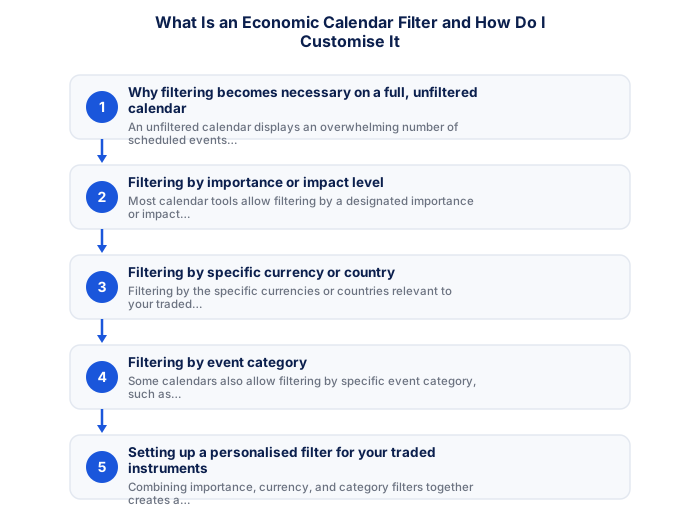
1. Why filtering becomes necessary on a full, unfiltered calendar
An unfiltered economic calendar lists every scheduled economic data release globally, hundreds of events per week across dozens of countries. Without filtering, this volume of information produces the opposite of its intended value: cognitive overload that makes it harder, not easier, to identify the events that actually matter for what you're trading.
The practical problem is most acute for traders focused on a small number of specific currency pairs or markets. A trader primarily trading USD/ZAR and EUR/USD doesn't need to track quarterly GDP data from minor Asian economies. The events that carry potential impact for their specific instruments are a fraction of the total calendar, and filtering reduces the visible calendar to that relevant fraction.
There's also a risk management dimension to this filtering. An unfiltered calendar creates the illusion of complete awareness while actually making it easy to miss the specific high-impact events that genuinely require preparation. A filtered calendar that shows only the events relevant to your traded instruments, sorted by impact level, makes it harder to be surprised by a scheduled release you didn't notice.
2. Filtering by importance or impact level
Most calendar tools categorise events by anticipated market impact: typically three tiers labelled high, medium, and low. High-impact events, central bank rate decisions, non-farm payrolls, CPI releases from major economies, have a reliable history of moving markets meaningfully. Medium and low-impact events have smaller or less consistent effects.
Filtering to show only high-impact events is the most common starting point and is appropriate for most retail traders. This typically reduces the visible calendar to ten to twenty events per week rather than several hundred, making it genuinely manageable to review and plan around.
- FSCA-regulated broker verified at fsca.co.za
- Demo account tested for minimum 60 days
- Trading plan written: entry, exits, position sizing
- Risk per trade defined (1-2% of account)
- Backup internet connection tested for load shedding
- Tax implications understood
The limitation of impact-level filtering alone is that a 'medium' impact event in a specific currency you're actively trading may matter more to your positions than a 'high' impact event in a currency you're not trading. This is why combining impact-level filtering with currency-specific filtering produces a more useful result than either alone.
3. Filtering by specific currency or country
Filtering by currency lets you narrow the calendar to events from the economies whose data actually affects your traded instruments. For a South African trader active on USD/ZAR, EUR/USD, and JSE instruments, filtering for US, Eurozone, and South African events covers most of what's relevant without the noise of unrelated countries.
South African-specific calendar events worth tracking regularly include SARB Monetary Policy Committee meetings, South African CPI releases, GDP data, and budget announcements from the National Treasury. These carry the most direct impact on the rand and ZAR crosses.
The SARB's interest rate decisions, in particular, deserve prominent placement in any South African trader's calendar. The MPC meets roughly six times per year, and rate decisions, or surprising changes in the forward guidance, produce sharp rand movements that can affect positions across all ZAR pairs.
4. Filtering by event category
Event category filtering allows further refinement beyond currency and impact level. If your strategy is particularly sensitive to central bank communications, you can filter to show only rate decisions and central bank speeches while excluding employment, housing, or trade data that doesn't fit your analytical framework.
For traders following a specific macro theme, tracking the Fed-ECB policy divergence narrative, for example, filtering for central bank-related events from both institutions creates a tailored calendar that surfaces exactly the events that update the thesis you're trading.
| Item | Detail |
|---|---|
| Regulator | FSCA, fsca.co.za |
| Exchange control | SARB, resbank.co.za |
| Tax authority | SARS, sars.gov.za |
| JSE hours | 09:00-17:00 SAST Mon-Fri |
| Best forex session | 15:00-17:00 SAST |
| CGT annual exclusion | R50,000 (individuals) |
Category filtering is most useful once you have enough experience to know which event types reliably affect the instruments you trade and which don't. Newer traders often find a broader filter more educational during the phase of learning which event types produce which market reactions.
5. Setting up a personalised filter for your traded instruments
Combining impact level, currency, and category filters creates a personalised calendar that shows only the scheduled events relevant to your specific traded instruments and strategy focus. Most major calendar platforms allow saving this filter combination so it loads automatically each time you check the calendar.
A practical starting configuration for South African retail traders focused on major forex pairs and ZAR instruments: filter to high and medium impact events, include US, Eurozone, UK, and South Africa as your currency selections, and save this as your default view. This typically produces a manageable fifteen to thirty events per week that are genuinely worth reviewing.
Building in a brief calendar review as part of your pre-session routine, checking what's scheduled for the next trading session and noting the timing of any high-impact events, converts the calendar from a resource you check reactively to one that actively shapes your session planning.
6. Reviewing and adjusting your filter periodically
As your traded instruments or strategy focus changes, your saved calendar filter should be updated to match. A filter set when you were primarily trading USD/ZAR may miss important events if you later add European pairs to your portfolio. Periodic review of your calendar configuration ensures it stays relevant to what you're actually trading.
It's also worth periodically checking whether your calendar tool's impact ratings reflect current market dynamics. Impact levels are sometimes based on historical volatility patterns that may not reflect current market sensitivity, a data release that once moved markets modestly may now be a primary driver if its context has changed.
Worth setting up specifically: a saved filter combination for exactly your traded currencies and your preferred impact threshold, rather than rebuilding this manually each time you use the calendar. Most platforms allow saving multiple filter presets, which means you can maintain a primary filter for active trading sessions and a broader filter for weekly review and analysis.
✕ Common mistakes
- Rebuilding filters from scratch each time rather than saving a preset. This friction is often why calendar-checking habits lapse over time.
- Setting filters once and never adjusting them as trading focus shifts. Your relevant currencies and impact thresholds may change as your strategy evolves.
- Filtering too narrowly and missing relevant events. Overly strict filters can hide releases still worth tracking.
- Assuming default filter settings suit your specific trading needs. Customisation tends to produce a considerably more useful calendar view.
Key Takeaways
- Calendar filters narrow displayed events by importance, currency, or category, helping traders focus specifically on releases relevant to their own trading.
- Calendar filters narrow displayed events by importance level, specific currency, or category.
- This helps traders focus specifically on releases relevant to their own trading.
- Why filtering becomes necessary on a full, unfiltered calendar.
- Filtering by importance or impact level.
The embeddable economic calendar widget filters by region and by impact, and can be placed on any website in one line of HTML.
Frequently asked follow-up questions
Do all economic calendar tools offer the same filtering options?
No, specific filtering capabilities vary by tool and provider; checking your particular calendar source confirms what filtering options are genuinely available.
Should I only ever look at high-impact events and ignore the rest?
This depends on your specific strategy; some traders do focus exclusively on high-impact events, while others find medium-impact releases relevant to their particular approach too.
Can I save my filter settings for future use?
Many calendar tools do allow saving personalised filter preferences, removing the need to reconfigure your settings every single time you check the calendar.
Does filtering ever cause me to miss a important unexpected event?
Properly calibrated importance filters should still capture significant scheduled events, though entirely unscheduled, surprise developments fall outside any calendar tool's scope regardless of filtering.
Is it worth using multiple different calendar sources for cross-verification?
Some traders do this for additional confidence, though one well-configured, reliable source is generally sufficient for most traders' needs.
