i Short answer
A checklist builder tool helps you create a structured, repeatable pre-trade checklist.
It's similar to a simple spreadsheet or note-taking app, but with added structure and reminders.
📋 ON THIS PAGE
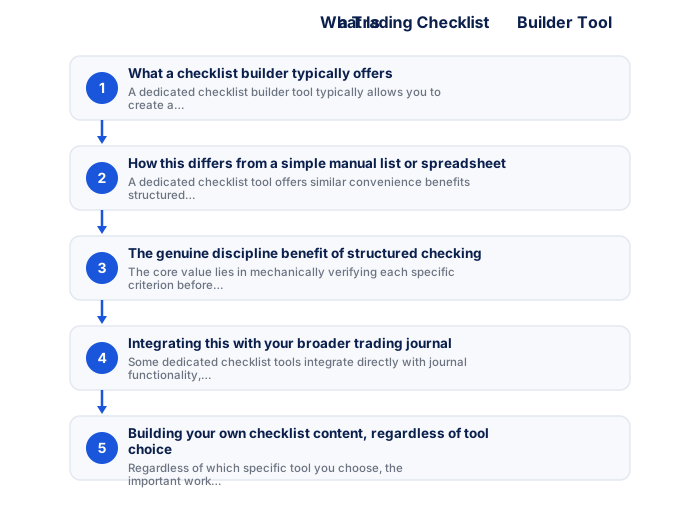
- What a checklist builder typically offers
- How this differs from a simple manual list or spreadsheet
- The genuine discipline benefit of structured checking
- Integrating this with your broader trading journal
- Building your own checklist content, regardless of tool choice
- Does a dedicated tool matter here, or is simplicity fine
1. What a checklist builder typically offers
A dedicated checklist builder tool typically allows you to create a customised list of specific criteria items, then check each one off sequentially before confirming a trade, sometimes with features like saving multiple different checklists for different strategies, or tracking how often each specific item was actually satisfied across your trading history.
2. How this differs from a simple manual list or spreadsheet
As, a dedicated checklist tool offers similar convenience benefits, structured prompts, sometimes automated reminders, without being strictly necessary, since a simple written list or basic spreadsheet, can achieve the same fundamental discipline-building purpose.
Choosing a trading platform involves balancing familiarity, charting capability, execution reliability, and the availability of features relevant to your specific strategy. South African traders should also verify that their platform of choice remains accessible during load shedding through mobile apps and that it supports the instruments and order types they need. Testing your platform thoroughly on a demo account before relying on it for live trading identifies any usability issues before they cost real money.
- Two-factor authentication enabled
- Unique password not shared with other sites
- Broker mobile app installed and tested
- Mobile data backup connection tested
- Price alerts set for active instruments
- Broker emergency number saved in phone
- Know how to close all positions in under 30 seconds
- Desktop: full charting, multi-monitor, all order types
- Mobile: real-time monitoring and load shedding backup
- Mobile: price alerts when away from desk
- Desktop: useless during load shedding without UPS
- Mobile: limited charting for detailed analysis
- Mobile: higher risk of fat-finger errors
- Full charting and analysis
- Best for trade entry
- Multi-monitor support
- More order types available
- Monitor and manage on the go
- Load shedding backup use
- Push price alerts
- Limited charting tools
3. The genuine discipline benefit of structured checking
As, the core value lies in mechanically verifying each specific criterion before executing a trade, removing the in-the-moment ambiguity, whether this checking happens through a dedicated app or a simple written list matters less than the consistency of actually performing this check every time.
| Feature | MT4 | MT5 |
|---|---|---|
| Broker availability | Very wide | Growing |
| EA library | Largest available | Smaller but growing |
| Timeframes | 9 built-in | 21 built-in |
| Asset classes | Forex and CFDs | Forex, CFDs, stocks |
| Mobile app | Good | More modern UI |
4. Integrating this with your broader trading journal
Some dedicated checklist tools integrate directly with journal functionality, automatically recording which specific criteria were met for each trade alongside your broader journal entry, providing a more complete, integrated record than maintaining checklist and journal as entirely separate, unconnected practices.
5. Building your own checklist content, regardless of tool choice
Regardless of which specific tool you choose, the genuinely important work involves thoughtfully defining your own specific, objective checklist criteria, reflecting your particular strategy's actual entry and risk management requirements, the tool itself simply provides structure for consistently applying criteria you've already carefully developed.
6. Does a dedicated tool genuinely matter here, or is simplicity fine
For most traders, particularly beginners still developing their checklist content and discipline, a simple, even handwritten checklist works perfectly well, with dedicated tools offering modest additional convenience that becomes more valuable primarily once you've already established the underlying habit and want some additional structure or integration.
South African traders who maintain a weekly review routine, checking the SARB economic calendar for the coming week, reviewing the Eskom load shedding schedule, assessing the current GNU coalition stability backdrop, and marking key support and resistance levels on the instruments they trade, consistently outperform traders who approach each session without any structured preparation. This weekly routine takes 30 to 45 minutes and produces a clearer analytical framework that reduces impulsive decisions and improves the quality of trade selection throughout the week.
Platform reliability during high-volatility events is a more important consideration than the breadth of analytical features for most retail traders. South African traders have an additional reliability concern that traders in stable electricity markets do not face: load shedding requires a tested mobile platform backup for managing open positions during power outages. Testing the mobile backup specifically, the ability to view positions, modify stops, and close trades, before going live with real capital is a practical step that traders outside South Africa simply do not need to consider. The best platform is ultimately the one you can use confidently under adverse conditions, not the one with the most features under ideal conditions. Confirming that your broker's mobile app functions correctly on your specific mobile device and 4G connection takes five minutes and could prevent a significant connectivity-related loss.
A checklist builder tool provides template starting points alongside the ability to add your own specific, objective criteria. The most useful checklists combine entry criteria with a risk management confirmation.
★ Why It Matters
Something worth doing regardless of which tool you use: review and revise your checklist itself every few months based on your journal, a checklist that hasn't changed since you wrote it on day one probably isn't capturing lessons from your actual more recent trading experience.
✕ Common mistakes
- Building a checklist once and never revisiting it. Periodic revision based on your journal keeps it genuinely useful.
- Making the checklist so long it becomes impractical to follow consistently. A shorter, followed checklist outperforms a complete but ignored one.
- Not testing whether the checklist app integrates well with your actual workflow. A tool that adds friction tends to get abandoned.
- Copying a generic checklist template without adapting it to your own strategy. A checklist should reflect your specific rules, not a generic one-size-fits-all list.
Analytical tools and frameworks add value only to the extent that they improve your actual trading decisions rather than providing reassurance or filling time between trades. The most effective approach to adopting new analytical tools is to paper-trade with them for a defined period, comparing outcomes against your results without the tool, before integrating them into your live trading process. South African traders should additionally assess whether any tool they consider incorporates SA-specific data sources, particularly SARB data, JSE specific feeds, and local economic calendar data, since global tools default to non-ZAR market data that may not fully capture the drivers relevant to their primary instruments.
Key Takeaways
- A checklist builder tool helps you create a structured, repeatable pre-trade checklist, similar to a simple spreadsheet but with added structure and reminders.
- A checklist builder tool helps you create a structured, repeatable pre-trade checklist.
- It's similar to a simple spreadsheet or note-taking app, but with added structure and reminders.
- What a checklist builder typically offers.
- How this differs from a simple manual list or spreadsheet.
See also: What Is a Risk of Ruin Calculator and Why Might I Use One?.
Frequently asked follow-up questions
Are dedicated checklist tools free?
Some are freely available, often as simple apps or templates, while more complete integrated platforms may require a paid subscription, similar to the broader free-versus-paid tools discussion elsewhere.
Should my checklist be the same for every trade?
It should reflect your specific strategy's criteria consistently, though you might maintain separate checklists for genuinely different strategies you trade.
Can I build an effective checklist without any specific software?
Yes, a simple written list or basic spreadsheet achieves the same fundamental discipline-building purpose without requiring dedicated software.
