i Short answer
Most economic calendars default to GMT, EST, or the viewer's detected browser timezone rather than South African Standard Time (SAST, UTC+2), meaning South African traders should explicitly set their calendar's timezone setting rather than mentally converting each release time individually.
Because South Africa does not observe daylight saving while the US, UK, and much of Europe do for part of the year, the time gap between SAST and these regions shifts by an hour twice annually, which can catch unadjusted traders off guard around those transition periods specifically.
📋 ON THIS PAGE
- Why timezone settings matter more than they first appear
- Setting your calendar to SAST correctly
- The daylight saving complication specifically
- Cross-checking release times around DST transition periods
- Building a reliable pre-session routine
- Common calendar tools and their South African time support
1. Why timezone settings matter more than they first appear
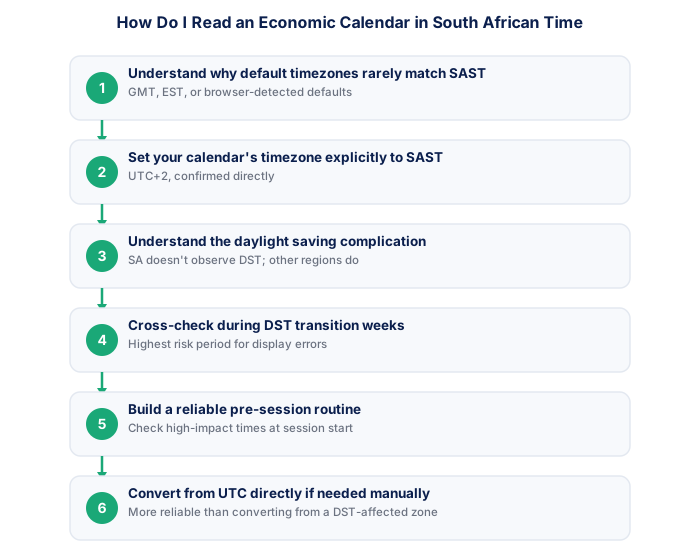
An economic calendar showing a US employment data release at "8:30" is meaningless without knowing which timezone that reflects, and most major calendar providers default to GMT, EST, or your browser's detected location, none of which is automatically South African Standard Time.
Manually converting each individual release time in your head, rather than setting the calendar's timezone preference directly, is both tedious and error-prone, particularly around daylight saving transitions when the required conversion offset itself changes.
2. Setting your calendar to SAST correctly
Most reputable economic calendar tools, including those built into major trading platforms and dedicated financial calendar websites, include a timezone selector, commonly found in account settings or directly on the calendar page itself, where South Africa (SAST, UTC+2) can typically be selected directly.
The first time you set this up, double-check it actually saved correctly rather than assuming it applied after a single click, comparing one known release time against an independent source to confirm the displayed time matches expectation.
- SARB economic calendar checked for the week
- Next Eskom load shedding schedule reviewed
- GNU stability news reviewed
- Stats SA data releases noted
- Credit agency review dates checked
- US/global events that move EM risk noted
3. The daylight saving complication specifically
South Africa does not observe daylight saving time, remaining at UTC+2 year-round, while the United States, United Kingdom, and most of Europe shift their clocks forward and back seasonally. This means the effective time difference between SAST and these regions is not constant across the year.
During the northern hemisphere's daylight saving period, the gap between SAST and US Eastern time is typically six hours; outside that period, it shifts to seven hours, a detail that catches out traders who memorised a single fixed offset rather than accounting for the seasonal shift.
| Event | Frequency | ZAR impact | Source |
|---|---|---|---|
| SARB MPC | 6x per year | High | resbank.co.za |
| Budget Speech | Annual (February) | Very high | treasury.gov.za |
| Credit reviews | Annual each agency | Very high | Agency sites |
| Stats SA CPI | Monthly | Medium | statssa.gov.za |
| Eskom stage | As needed | Low-medium | eskomsepush.com |
- SA context provides genuine informational edge
- ZAR pairs accessible via FSCA brokers in ZAR accounts
- Rand volatility creates larger intraday ranges
- 6 SARB meetings/year create regular macro setups
- Higher geopolitical risk than G10 pairs
- Load shedding creates unique operational disruptions
- SA rand liquidity thinner than major G10 pairs
- SA-specific news requires constant local monitoring
4. Cross-checking release times around DST transition periods
The weeks immediately surrounding US and European daylight saving transitions, which do not occur on the same calendar dates as any South African seasonal change since South Africa has none, are worth double-checking specifically, since a calendar tool with a timezone bug or a stale cached setting is more likely to display an incorrect time during exactly this transition window.
Cross-referencing a high-importance release time against a second, independent source during these specific transition weeks is a reasonable precaution, given the real cost of missing or mistiming a significant scheduled release.
5. Building a reliable pre-session routine
Many traders check the calendar's high-impact releases for the day at the start of their trading session, noting the SAST-adjusted times directly rather than relying on memory of typical release patterns, since even regularly scheduled releases can occasionally shift.
Setting a calendar reminder or alert a short period before a specific high-impact release you intend to trade around, once you have confirmed the correct SAST time, removes the need to actively monitor the clock throughout the session yourself.
6. Common calendar tools and their South African time support
Most major, established economic calendar providers do support a South African or general UTC+2 timezone selection directly, though the specific labelling and setting location varies by platform, worth locating once during initial setup rather than each time you visit.
If a specific tool genuinely lacks proper South African timezone support, calculating the correct SAST offset from the displayed UTC or GMT time directly, rather than from a different regional time shown, tends to be the more reliable manual conversion approach given UTC does not itself observe daylight saving.
★ Why It Matters
Worth marking the specific weeks each year when US and European daylight saving transitions occur, since these are the periods where a mistimed high-impact release is most likely if your calendar's timezone handling has any bug or stale caching issue.
✕ Common mistakes
- Relying on a calendar's default timezone without checking it explicitly. Defaults are commonly GMT, EST, or browser-detected, rarely SAST automatically.
- Applying a single fixed offset year-round without accounting for northern hemisphere daylight saving. The gap between SAST and US or European time shifts seasonally by an hour.
- Not cross-checking release times during DST transition weeks specifically. This is when timezone display errors or stale settings are most likely to cause a mistimed release.
- Converting from a displayed regional time rather than from UTC directly. Converting from UTC avoids compounding a potential daylight saving error in the source display.
How often should I do this?
There is no target. Frequency should follow the setups the market offers, not a quota. Trade frequency covers the cost of forcing it.
Key Takeaways
- Most economic calendars default to GMT, EST, or the viewer's detected browser timezone rather than South African Standard Time (SAST, UTC+2), meaning South African traders should explicitly set their calendar's timezone setting rather than mentally converting each release time individually.
- Why timezone settings matter more than they first appear.
- Setting your calendar to SAST correctly.
- The daylight saving complication specifically.
- Cross-checking release times around DST transition periods.
The TradeAnswers economic calendar widget shows these releases in South African time and is free to embed on any website.
See also: What Are Forex Trading Hours in SA Time?.
Frequently asked follow-up questions
Does South Africa ever change its clocks for daylight saving?
No, South Africa remains at SAST (UTC+2) year-round with no seasonal clock changes, which is precisely why the offset to DST-observing regions shifts instead.
Which is more reliable to convert from, GMT or UTC?
For calendar purposes they are effectively equivalent for this use case, since neither GMT nor UTC observes daylight saving, making either a stable, reliable conversion reference point.
Can I trust my trading platform's built-in calendar to already be correct for SAST?
Many are, but it's worth explicitly confirming the timezone setting rather than assuming, particularly after any platform update which can occasionally reset custom settings to a default.
