i Short answer
A good home trading space needs a reliable computer, one or two screens, a stable connection with a mobile-data backup, power backup for outages, and a quiet spot where you can focus and then walk away. It need not be expensive: a second monitor, a small UPS and a decent chair cost about R6,000 together, 20% of a R30,000 account, so add equipment gradually. The bigger benefit is separation: a set place and time for trading keeps it from spreading through your day.
📋 ON THIS PAGE
1. What does a trading space need?
| Item | Why | Typical cost |
|---|---|---|
| Computer | Full platform features | Existing machine often fine |
| Second monitor | Charts and platform side by side | About R2,500 |
| UPS or inverter | Ride through outages | From about R1,500 |
| Chair and desk | Comfort for long sessions | About R2,000 and up |
| Mobile data backup | If fibre drops | Data bundle |
Devices are covered in dedicated trading devices, and connections in internet connections for trading.
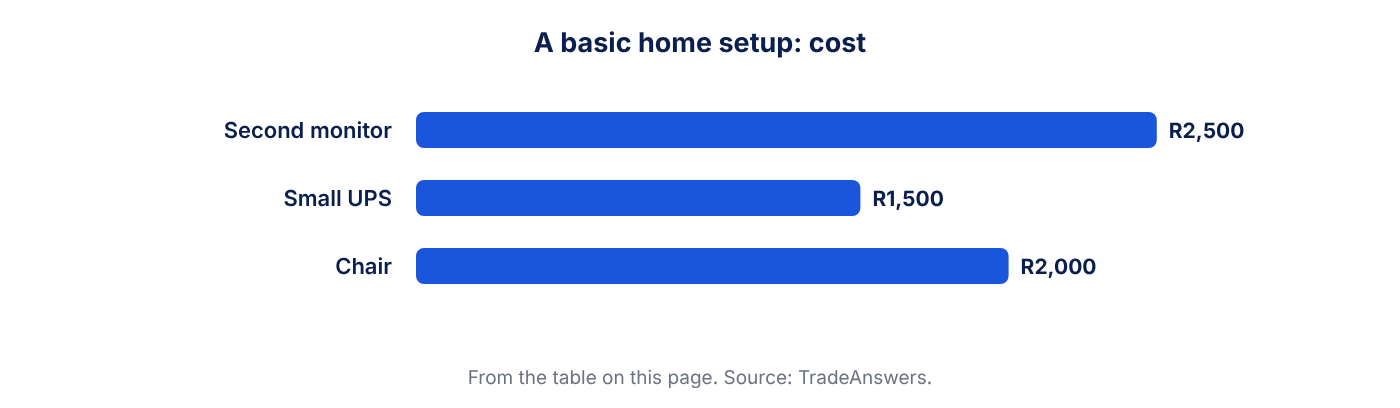
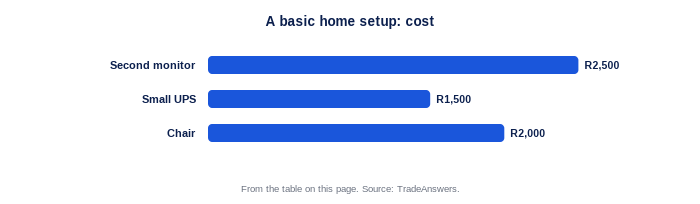
2. What does a basic setup cost? A worked example
Assumptions (hypothetical example): an existing computer; a second monitor at R2,500; a small UPS at R1,500; a chair at R2,000; a R30,000 trading account.
| Item | Cost | Running total |
|---|---|---|
| Second monitor | R2,500 | R2,500 |
| Small UPS | R1,500 | R4,000 |
| Chair | R2,000 | R6,000 |
| Share of a R30,000 account | 20% |
⬇ Download this chart (PNG) · Free to reuse with the credit “Source: TradeAnswers, How Do I Set Up a Dedicated Trading Space at Home?” (CC BY 4.0).
Buy items as your trading proves itself, not in advance. Outages are covered in load-shedding and your trading day.
3. How do you keep trading separate from home life?
- Trade only at your desk, not from the couch
- Fixed start and stop times
- Notifications off outside sessions
- Tell your household your trading hours
- Leave the space when the session ends
Balance is covered in balancing trading with family life, and screen time in screen time management.
4. What about health and ergonomics?
Screens at eye level, regular breaks and good lighting reduce strain in long sessions. Sleep and health are covered in trading, sleep and health (FSCA).
Planning for load-shedding and outages
- Put the router and fibre box on the UPS or inverter, not only the computer; a computer without internet cannot manage a trade.
- Keep a phone with mobile data and the broker’s app logged in as a second route to your account.
- Place stop-loss orders on the broker’s server when you open a trade, so an outage at home does not leave a position unmanaged.
- Check your area’s outage schedule before trading around a news release, and avoid opening new positions just before a scheduled outage.
Choosing the connection
| Connection | Strength | Weakness |
|---|---|---|
| Fibre | Stable, low delay | Needs power for the router and box |
| Fixed wireless or LTE | Available where fibre is not | More variable delay and speed |
| Phone hotspot | Good as a backup | Data costs and battery use |
For most retail trading, stability matters more than speed: a steady connection with a backup is better than a fast one that drops.
Agreeing the space with your household
A trading space works better when others at home know what it is for. Agree when you are trading and should not be interrupted, and when you are available, so the space does not quietly take over evenings. Keeping trading in that one place also helps you leave it: when you walk away from the desk, the trading day is over. Shared family devices are better kept free of trading apps altogether.
Keeping the plan in sight
A printed copy of the trading plan and the current risk limits beside the screen does more than another monitor. Before each trade, glance at it: is this set-up on the page, and does the size fit the limit? Keep the journal open at the desk too, so entries are written when trades happen rather than reconstructed later from memory.
★ Why It Matters
A home trading space is less about equipment than about boundaries: a reliable setup in one place, used at set times, and left behind when the session ends.
✕ Common mistakes
- Buying expensive kit before results. Add equipment gradually.
- No power or data backup. Outages happen.
- Trading from anywhere in the house. Use one space.
- No stop time. Set session hours.
Key Takeaways
- Test your UPS by running the setup on battery for 30 minutes.
- Label cables and power points so you can reset quickly.
- Keep the space free of non-trading screens.
- Review the setup every six months.
Frequently asked follow-up questions
What do I need for a home trading setup?
A reliable computer, one or two screens, backup connection and power.
Do I need multiple monitors?
Two help, one for charts and one for the platform and journal; more are rarely needed and mainly add more to watch.
How do I handle load-shedding?
A UPS or inverter plus mobile data backup.
How much should I spend?
Little at first. Upgrade parts of the set-up only when a specific problem, such as outages or a cramped screen, keeps affecting your trading.
How do I keep trading from taking over?
Fixed hours in one place.